How to set the temperature of your refrigerator and freezer
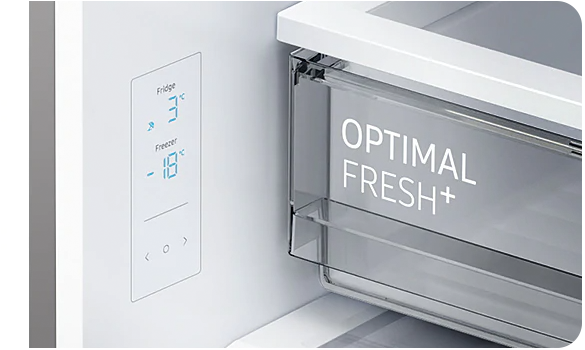
Setting the right temperature is essential for preserving your food at optimal freshness, maintaining its quality, and ensuring it lasts as long as possible. By following our video and the guide below, you will know how to adjust your appliance to safe and efficient settings. For best results, it is recommended that your fridge is set to +3 °C and your freezer to -18 °C, as these temperatures help keep food fresh while preventing the growth of harmful bacteria.
Setting the right temperature helps keep your food fresh and your fridge freezer running efficiently.
In this video, we’ll show you how to adjust the temperature on different Samsung fridge freezer display types.
Recommended Temperatures
As a general guide, the recommended temperature is plus 3 degrees Celsius for the fridge, and minus 18 degrees Celsius for the freezer.
Please note, the ideal setting can vary depending on the room temperature. These recommendations are based on an ambient temperature of 25 degrees Celsius.
Overview of the Main Display
On many models, adjusting the temperature is quick and simple.
- First, tap any button to wake up the display.
- On some models, this step may not be required.
- Next, tap the button used to select either the fridge or freezer compartment.
- The selected compartment indicator will begin to flash.
- Then use the left or right controls to choose your desired temperature or function.
- Wait for around five seconds to confirm your selection.
Once confirmed, the indicator will stop flashing.
Models with an External Temperature Display
Some Samsung fridge freezers use an external temperature display.
To adjust the fridge temperature, wake the display, then press the Fridge button to cycle through the available settings, one degree at a time, from 7 degrees down to 1 degree.
Once you reach the temperature you want, it will set automatically.
To adjust the freezer, press the Freezer button to cycle through the settings from minus 15 degrees down to minus 23 degrees.
Again, once you stop on the setting you want, it will confirm automatically.
Models with Twin Cooling Displays
Models with Twin Cooling displays use preset temperature steps.
To set the fridge temperature, press the Fridge Power Cool button to cycle through 1, 2, 3, 5, or 7 degrees Celsius.
To set the freezer temperature, press the Freezer Power Freeze button to cycle through minus 23, minus 21, minus 19, minus 17, or minus 15 degrees Celsius.
Once you reach the desired setting, it will apply automatically.
Side-by-Side Twin Cooling Displays
On side-by-side Twin Cooling models, the controls are slightly different.
To adjust the fridge temperature, press the Fridge button to cycle through the available settings, one degree at a time, from 7 degrees down to 1 degree.
To activate Power Cool, press and hold the Fridge button for three seconds.
The indicator will light up, and the refrigerator will enter speed cool mode for faster cooling.
To adjust the freezer temperature, press the Freezer button to cycle through the available settings from minus 15 degrees down to minus 23 degrees.
To activate Power Freeze, press and hold the Freezer button for three seconds.
The indicator will light up, and the freezer will enter speed freeze mode.
Important Note About Power Freeze
Power Freeze will automatically switch off after 50 hours.
You can also deactivate it earlier by pressing and holding the Freezer button again for three seconds.
Please note, using Power Freeze increases power consumption, so it’s best to switch it off once it’s no longer needed.
Helpful Reminder
If your fridge freezer display looks different from the ones shown here, check your user manual for model-specific guidance.
The right temperature helps your food stay fresher for longer and keeps your appliance performing at its best.
For more helpful guides and appliance support, visit Samsung Support, where you can find detailed instructions for your specific model.
It is important to set the temperature of your refrigerator and freezer so that you can preserve your food for optimum freshness and longevity. The recommended temperature setting for food storage is:
- Fridge: +2 °C
- Freezer: -18 °C
Please note: The optimal temperature setting of each compartment depends on the ambient temperature. The recommended temperature given above is based on the ambient temperature of 25°C.
If your Samsung fridge isn't cooling as expecting, follow our solution guide here or troubleshoot to book a repair.
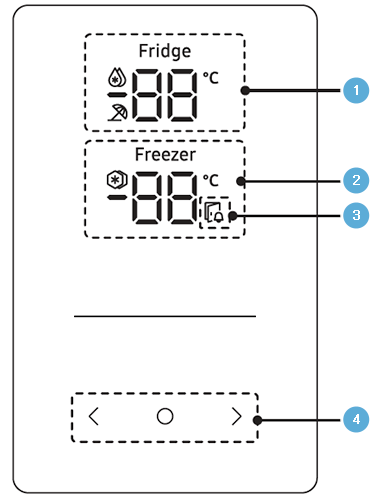
Control panel
The exact control panel on your refrigerator depends on the model.
|
1 |
Fridge indicator |
Displays the current or desired temperature of the fridge. The raindrop icon indicates that the Power Cool function is on. The umbrella icon indicates that the Vacation function is on. |
|---|---|---|
|
2 |
Freezer indicator |
Displays the current or desired temperature of the freezer. The freeze icon indicates that the Power Freeze function is on. |
|
3 |
Door open indicator |
This indicator blinks with an alarm if the door is left open for more than 2 minutes. |
|
4 |
Buttons |
When the display is off, tap any button to wake up the display. Use O to select the fridge or freezer and < or > to select the desired temperature or function for the selected compartment. |
Set the temperature
Please note: This step may not be required for some models.
- The selected compartment's indicator will blink.
- The degrees Celsius symbol (°C) will not blink.
Thank you for your feedback!
Please answer all questions.